EN
business formation
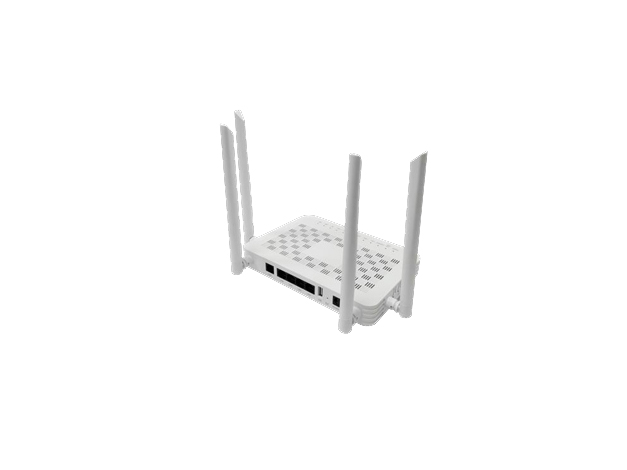
GP-541 is a GPON ONT which is suited for FTTx residential applications. It complies with the ITU-T G.984 standard, provides 2.488Gbps downlink & 1.244Gbps uplink bandwidth at network side, and provides four(4) GE port, one(1) FXS, one(1) USB 2.0 and Wi-Fi 5 AC1200 WLAN port at user side.
GP-541 is a GPON ONT which is suited for FTTx residential applications. It complies with the ITU-T G.984 standard,provides 2.488Gbps downlink & 1.244Gbps uplink bandwidth at network side, and provides four(4) GE port, one(1) FXS,one(1) USB 2.0 and Wi-Fi 5 AC1200 WLAN port at user side.
The device provides high performance Data, Voice and Video services for individual users, SOHO (small office or family office), small businesses, etc.
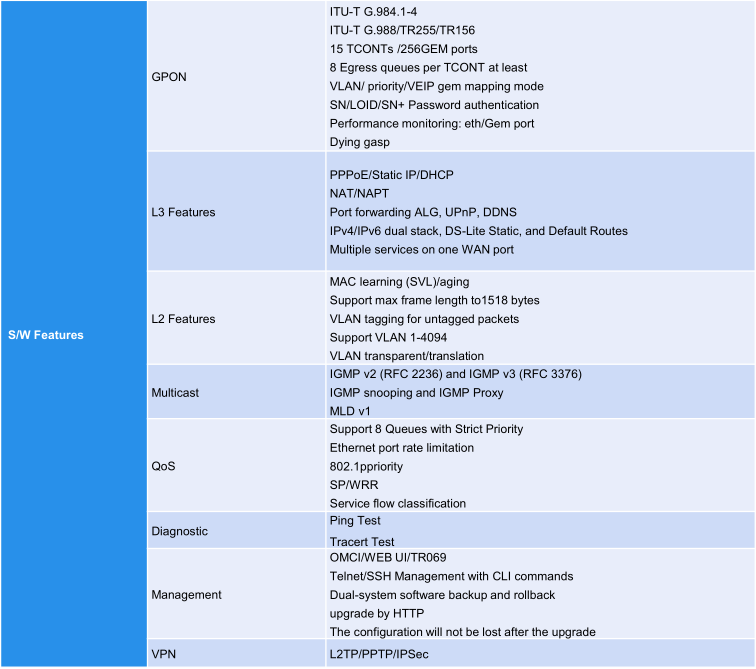
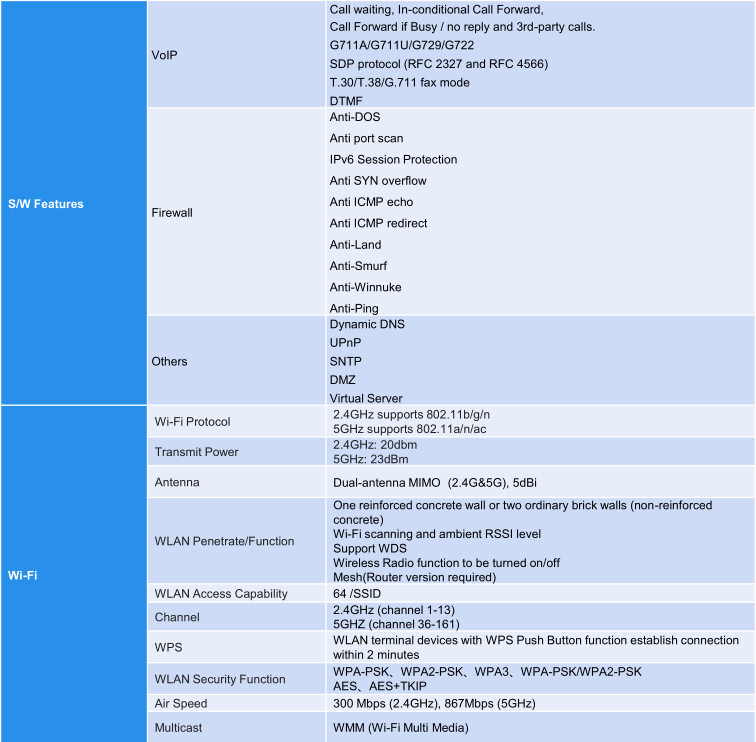
| General |
Product Model: GP-541 ONT Type: GPON HGU Uplink: GPON Downlink: 4*GE + 1*FXS + Wi-Fi 5 + 1*USB Flash: 256MB NAND Memory: 512MB DDR4 Operating Temperature: -5 to 45°C Storage Temperature: -20 to 70°C Operating Humidity: 5% to 95%,non-condensing Installation: Desktop & Wall-mounted Dimensions: 190mm*135mm*33mm Net Weight: 240g |
| PON |
PON Interface: GPON Connector: SC/UPC or SC/APC Data Rate: Downlink: 2.488Gbps; Uplink: 1.244Gbps Standard Compliance: ITU-T G.984 Pout(Optical Transmitter Power): 0dBm~4dBm Psens(Optical Sensitivity): -28dBm~-8dBm |
| GE LAN |
Ethernet Interface: RJ45 connectors Standard Compliance: IEEE 802.3, 802.3u, 802.3ab Link:Half-duplex and full-duplex operations; 10/100/1000 BaseT auto-negotiation and manual configuration; MDI/MDIX auto detection Full duplex IEEE 802.3x flow control and half duplex back-pressure flow control |
| FXS |
VoIP Interface: RJ11 connectors |
| USB |
Interface: USB 2.0 |
| Power |
Max Power Consumption: 10 watts Power Options: Wall adapter Wall Adapter: 100-240VAC in, 50/60Hz 12VDC out, 1.5A |
| Indicators |
PWR / PON / LOS / Internet / USB / 2.4G / 5G / WPS / LAN / VOIP |
| Button |
Reset: Reset to factory default Wi-Fi: Turn on/off WLAN WPS: Push button to start WPS pairing LED: Turn on/off LED indicator Power switch: Push button power on or off |
Related products
MSTP Integrated Service Transmission Equipment
32 channels voice over IP PCM Equipment
TDM over IP Equipment
8 channels E1 channel protection switching equipment